Preferences
View layout, agent providers, LSP, sync, file recovery, and project vs global settings.
Open the Preferences tab from the UI (in-app settings). Changes can apply to the current project (stored under .rope_notes/) and/or global app state.
Sections
View
- UI scale, theme seed color, gutter / minimap defaults
- Editor options for normal use vs “file launch” scopes
- Browser layout — which tools sit in which of the three slots, separately for portrait and landscape (with a live preview)
Files / File recovery
- Backup (
.bak) rotation - Trash archive retention and restore
- Related safe-save behavior
Restore deleted/overwritten files from the recovery UI when available.
Agent
- Model providers (backend, URL, model, credentials)
- Connection testing and model lists
- Session behavior (e.g. continue last chat, retention)
- Semantic (cognitive) memory toggle and HuggingFace token when needed
See AI agent.
Sessions
- How long chat sessions are kept
- Related retention / cleanup options
Language server
- Enable/disable analysis
- Process vs isolate backend
- SDK / custom LSP URL when needed
See Language server.
Sync
- Live sync, discovery, pairing, trusted peers, approvals
See P2P sync.
Git
- Git-related preferences and credential handling where supported
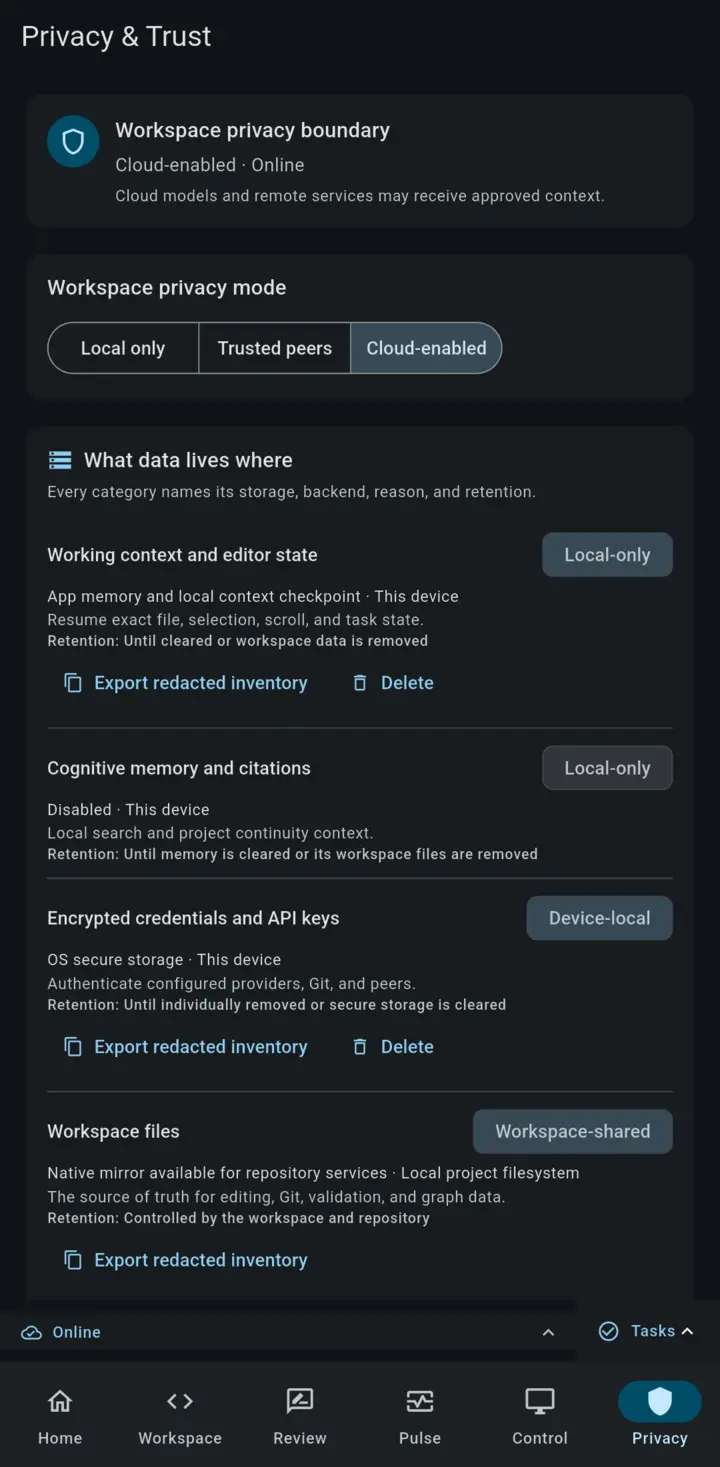
Privacy & Trust
Open Privacy & Trust from the mobile navigation to see the active privacy mode and a data inventory for the current workspace. The inventory labels data as Local only, Device-local, or Workspace-shared so the storage and sharing boundary is visible before you connect a provider or peer.
Project vs global
| Kind | Examples |
|---|---|
Project (.rope_notes/) | View layout, agent providers, permissions, sync ledger, sessions |
| Global | Last opened folder, some app-wide defaults |
Sharing a repo with .rope_notes/preferences.toml can share agent provider configuration with collaborators — be careful not to commit secrets. Prefer secure credential storage for API keys.
Resizable dialogs
About, Properties, Session Transfer, and similar windows can be dragged/resized. Scaling follows your UI scale preference.